For a long time, I've had the idea of making a personal timeline. I've been looking into using Obsidian for this, as Obsidian falls neatly into the programmatic creation of a timeline, but allows for personal privacy that a personal timeline needs.
There are a few areas that I think a personal timeline comes in handy... simple things like capturing milestones like weddings, events attended, jobs gained and lost, but also allows for easily looking up what happened in a given year. I don't know yet how and where I'll include this into my personal workflow, but it's something fun to investigate, which is what I'm doing.
https://github.com/Darakah/obsidian-timelines
To render a timeline in a note:
- Add the
timelinetag to the note, either in the YAML frontmatter or somewhere else. - Create a
timelinecode block or a timeline HTML comment for static rendering.
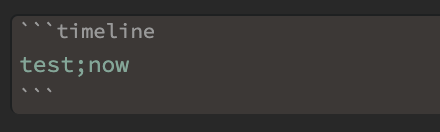
Using a Timeline code block for dynamic rendering
Create the following code block where a timeline is to be inserted:
Timeline Event Properties
Timeline events must specify the following:
- a valid date, YEAR-MONTH-DAY-MINUTES (check info section below for more details)
- a valid class, specifically
ob-timelinesmust be specified.
All other fields are optional.
Invalid timeline events will be skipped.
Timeline Entry
A timeline entry can be created using a <span></span> or <div></div> tag, with the following attributes:
<span
	  class='ob-timelines'
	  data-date='2000-10-10-00'
	  data-title='Another Event'
	  data-class='orange'
	  data-img = 'Timeline Example/Timeline_2.jpg'
	  data-type='range'
	  data-end='2000-10-20-00'>
	A second event!
</span>
Timeline span and div entries (.ob-timelines class) are hidden in preview by default, however, if you wish to display content, try a snippet like this:
/* Render the ob-timelines span or div elements as inline blocks that use an italic font */
.ob-timelines {
  display: inline-block !important;
  font-style: italic;
}
/* Use the before pseudo element to display attributes of the span or div */
.ob-timelines::before {
  content: "🔖 " attr(data-date) ": " attr(data-title) ". ";
  color: lilac;
  font-weight: 500;
}
Using the above snippet, a span like this:
<span class='ob-timelines' data-date='1499-03-28-00' data-title="An example"></span>
would be rendered as:

Dates
The most important and essential info for the timeline entry is the date. Timeline entries can be used for fantasy timelines, leading to a simplified set of rules for valid dates.
A valid date is specified as YEAR-MONTH-DAY-HOUR.
- All four segments must be present.
- Each segment can contain only numbers, but can be any length.
- The YEAR (first segment) can be negative:
-123-45-678-9is a valid date.
Rightmost-segments containing only zeros will be omitted when the timeline is generated, for example:
2300-02-00-00will display as2300-022300-00-00-00will display as2300
Event sorting
Event sorting is performed by converting the date into a number. For fantasy calendars, you may need to pad months, days, or hours with zeros to ensure sorting works properly.
2300-02-00-00is sorted as2300020000-234-02-00-00is sorted as-234020000
For statically generated timelines, events that occur at the same time are grouped, and are either prepended or appended to a list based on your timeline sorting preference.
Title:
- Optional
- If a title is not specified the name of the note will be used
Description:
- Optional
- If a description is not specified an empty section will be shown
Background Image:
- Optional
- If an image is not specified no image will be shown (just text)
- If an invalid url is given, an empty black section will be seen for that note card
- Currently only
http&absolute local pathwill render. Obsidian releasev0.10.13blocked obsidian links for background images.
CSS Class:
- Optional
- Adds the applied css class to the note card associated with the timeline entry